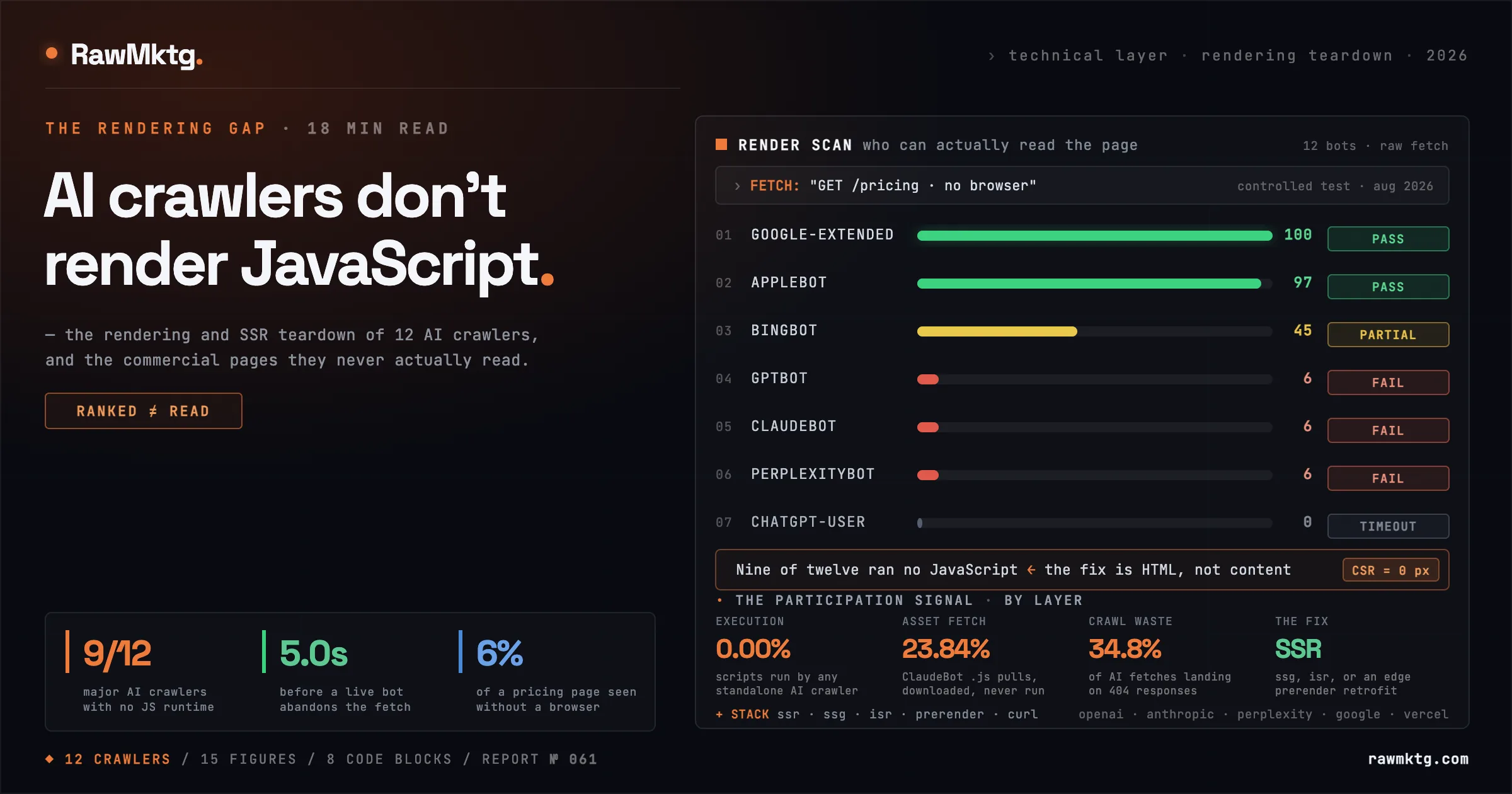
A page that looks perfect in Chrome can arrive at an AI engine as forty lines of boilerplate and one empty container. Not a slow page. Not a blocked page. An empty one.
This keeps turning up in teardowns. A company ranks well, has real content, has a technically clean site, and gets almost nothing in AI answers. Then you fetch the page the way a bot fetches it, without a browser, and the pricing table is gone. The feature list is gone. The FAQ is gone. What is left is a title tag and a script tag. The cause is architectural, and it is not a secret: industry benchmarks put the share of AI crawlers that cannot execute JavaScript at roughly 69%.
This piece is the rendering layer specifically. It does not repeat the crawler roster or the robots.txt rules, which are covered in how AI crawlers index your site. That is about access. This is about whether, once a bot is through the door, there is anything on the page for it to read.
01Crawling, fetching and executing: what's the difference?
Crawling is the network transaction: a GET returns status, headers and a body, one round trip. Asset fetching is the bot parsing that body, finding references to stylesheets, scripts and images, and issuing secondary GETs. Fetching a file is not the same as using it. Script execution is a different category of work: initialising a JS runtime, building the DOM and CSSOM, firing lifecycle events, waiting on async calls to your API, and hydrating the interface. It needs a browser.
The distinction matters because several AI bots do fetch your JavaScript files, which makes their logs look like rendering. They are not rendering. Those files are collected as raw text for training corpora, not executed to paint components. The reason is economics, not capability: a search engine monetises the index and can pay for a fleet of headless Chromium instances; an AI operator optimising for corpus volume and a two-second answer cuts the browser out of the hot path.
02Which AI crawlers render JavaScript, and which don't?
| Crawler | Purpose | JS execution | Infrastructure | JS fetch rate | Timeout |
|---|---|---|---|---|---|
| GPTBot | Training corpus | FAIL | HTTP client | ~11.50% | ~9.0s |
| OAI-SearchBot | ChatGPT search index | FAIL | HTTP client | < 1.0% | ~5.0s |
| ChatGPT-User | Live user retrieval | FAIL | Zero-footprint client | 0.00% | ~5.0s, HTTP 499 |
| ClaudeBot | Training corpus | FAIL | HTTP client | ~23.84% | ~5.0 to 8.0s |
| Claude-SearchBot | Live search index | FAIL | HTTP client | ~5.0% | ~5.0s |
| PerplexityBot | Indexing and live RAG | FAIL | HTTP client | < 2.0% | ~5.0s |
| Meta-ExternalAgent | Training corpus | FAIL | HTTP client | Minimal | Standard HTTP |
| Bytespider | Training corpus | FAIL | HTTP client | Minimal | Standard HTTP |
| CCBot | Common Crawl | FAIL | HTTP client | Minimal | Standard HTTP |
| Google-Extended | Gemini training access | PASS | Googlebot WRS | > 80% | Deferred queue |
| Applebot | Siri and Apple search | PASS | Browser-based | > 70% | Browser lifecycle |
| Bingbot | Bing index, ChatGPT RAG | LIMITED | Legacy WRS | Moderate | Variable |
The pattern is clean. Every crawler that passes is operated by a company that already ran a search engine before it ran a model. Google-Extended is not really a crawler at all, it is an access token in robots.txt that governs whether Googlebot's Web Rendering Service output can feed Gemini training. Applebot inherits Apple's browser-based crawling stack. Everyone else built new infrastructure in the last three years, and nobody building new infrastructure chose to put Chromium in the hot path.
Nine of the twelve major AI crawlers run no JavaScript runtime at all.
The two that pass do so because they inherit an existing search rendering pipeline, not because AI companies decided rendering matters.
Fetching a .js file and executing it are unrelated events. ClaudeBot downloads scripts on nearly a quarter of its requests and runs none of them.
03Why do the user agents look like browsers?
ClaudeBot fetches JavaScript on roughly 23.84% of its requests, more than double OpenAI's rate, and spends another 35.17% of its fetches on images. It runs none of the scripts it downloads. GPTBot sits at 11.50%. ChatGPT-User, the bot that fires when a person asks a live question in a chat window, fetches no secondary assets at all, zero CSS, zero JS, one request and done. If you are diagnosing this from server logs, that is the trap: you will see a bot that identifies as Chrome, requesting your bundle files, hitting your CDN, generating traffic that looks like a browser session. It never renders a pixel.
04What does each AI fleet actually do?
OpenAI
GPTBot handles training-corpus collection, OAI-SearchBot builds the search index, and ChatGPT-User fetches URLs live when a conversation needs them. Telemetry across more than 500 million GPTBot fetches recorded zero instances of client-side script execution. ChatGPT-User is the strictest of the three, because a person is waiting: it runs a roughly five-second ceiling, and if your page does not deliver text inside that window it issues an HTTP 499, closes the connection, and falls back to querying Google with a site: operator to scrape whatever the cached index holds. Your server sees a request; your page never gets read; the answer gets built from someone else's summary of you.
Anthropic
ClaudeBot and Claude-SearchBot behave the same way structurally. Server-log monitoring across Next.js endpoints shows heavy asset fetching and no runtime. Content painted by client-side scripts comes back as an empty shell, and the download volume is misleading, which is exactly why so many teams conclude they are fine.
Perplexity, Google and Apple
PerplexityBot is built for low-latency live retrieval and skips asset downloading almost entirely, processing raw markup. In benchmarks against a client-rendered React app it says so out loud, telling the user the page depends on dynamic JavaScript and it cannot summarise it, the honest failure case; the dangerous one is silence. Gemini is the exception, and an inherited one: it sits on Google's search infrastructure and benefits from the Web Rendering Service, so client-rendered content stays visible as long as Googlebot's Chromium instances do not time out first. Applebot similarly runs browser-based crawling. Neither is evidence that AI crawlers render, both are evidence that search crawlers render and two AI products happen to be downstream of one.
05What does a non-rendering crawler actually receive?
This is what a non-rendering crawler receives, the raw server response that GPTBot, ClaudeBot and PerplexityBot ingest:
<!DOCTYPE html>
<html lang="en">
<head>
  <meta charset="UTF-8">
  <title>Enterprise Analytics Platform | Pricing & Features</title>
  <script src="/static/js/main.7c89b2e1.js" defer></script>
  <link href="/static/css/main.css" rel="stylesheet">
</head>
<body>
  <div id="root"></div>
  <!-- Parsing ends here. Extractable content: 0 bytes. -->
</body>
</html>
And this is what a browser, Googlebot or Applebot ends up with once the runtime has run:
<body>
  <div id="root">
    <main class="dashboard-container">
      <h1>Enterprise Analytics Engine</h1>
      <section class="pricing-matrix">
        <h2>Plan pricing</h2>
        <div class="tier">
          <h3>Pro Plan</h3>
          <p class="price">$299 / month</p>
          <ul class="features">
            <li>Real-time event streaming</li>
            <li>Automated LLM citation tracking</li>
            <li>Unlimited seat licenses</li>
          </ul>
        </div>
      </section>
    </main>
  </div>
</body>
Same URL, two payloads. The bot gets the first box; your buyer's question gets answered from the second, on somebody else's site. The useful way to quantify this is a single ratio: the extractable body text in the raw response divided by the extractable body text in the hydrated DOM.
CVR      =  T_raw / T_rendered           # Content Visibility Ratio
CVR_site =  Σ (CVR_i x V_i) / Σ V_i       # weight by commercial value

  T  = word count of visible body text (excl. nav, scripts, boilerplate)
  V  = commercial weight of page i (use pipeline influence, not sessions)
  1.0 = fully server-rendered   ~0.0 = pure client-rendered
A fully server-rendered page sits near 1.0, a pure client-rendered page near 0.0, and most real sites are hybrids: a static marketing shell with a dynamically loaded pricing widget, or a server-rendered article with client-loaded comparison tables. Compute the site-level number too, but weight it by commercial value, not page count, an average across ten thousand blog URLs will tell you everything is fine while the six pages that matter score near zero.
06Why does the five-second budget break client-rendered pages?
T_visible = TTFB + T_transfer + T_bundle + T_exec + T_api  < 5000 ms

  server-rendered page:  only TTFB + T_transfer exist
  client-rendered page:  all five terms, in series, before any text
  target: TTFB < 500 ms, full response well inside the 5s ceiling
The practical target is a time to first byte under 500 milliseconds with the full response well inside five seconds, achievable on almost any stack when the HTML is complete on arrival, and close to impossible when the content depends on a round trip your API has not started yet. Geography makes it worse, and it is the part most teams outside the United States miss: the AI fleets do not crawl from distributed regions. ChatGPT fetches primarily out of Des Moines and Phoenix, and Claude crawls exclusively out of Columbus. If your origin sits in Frankfurt, Mumbai or Singapore, every request pays a trans-continental round trip out of the same five-second budget, and no CDN edge helps you if the HTML itself is assembled at the origin.
07Why do your logs look busier than your visibility?
Vercel's telemetry across Next.js infrastructure puts ChatGPT at 34.82% of fetches hitting 404s and Claude at 34.16%, largely from repeated requests for stale files under paths like /static/js/. ChatGPT burns a further 14.36% in redirect chains, against Googlebot's 1.49%. Two consequences: raw bot hit counts are a terrible proxy for how much of your content was actually read, and crawl budget is finite even for well-funded crawlers, so the waste comes out of the same allocation your real pages need.
| Signal in your logs | What it looks like | What it actually means |
|---|---|---|
| Chrome-like user agent | A browser session | A command-line HTTP client with a costume |
| Requests for .js bundles | Rendering in progress | Text collection for a training corpus |
| High 404 rate on /static/ | A broken deploy | URL extraction without a build manifest |
| HTTP 499 on a slow route | A network blip | A live-retrieval bot hit its timeout and left |
| Heavy bot traffic, no citations | A content problem | Usually a rendering problem |
08Why does client-side rendering fail twice?
ChatGPT Search does not fetch most URLs live, roughly 92% of its live web queries resolve through Bing's index rather than a fresh GPTBot request. Bingbot's rendering is limited and selective compared with Googlebot's. So the client-rendered page misses on the direct path because OpenAI's bots run no runtime, and misses on the indexed path because the index it is reading from never held the rendered DOM either.
P(visible) = 1 - (1 - r_direct)(1 - r_index)

  r_direct = P(a live bot fetch returns extractable content)
  r_index  = P(the index it falls back to holds rendered text)
  client-side rendering drives BOTH terms toward zero at once.
The page types this hits hardest are the commercial ones. Product and specification pages account for around 20.1% of AI citations and 14.2% of post-referral conversions; comparison and alternatives pages account for another 9.3% and carry the highest purchase intent on the site. Those are exactly the pages built as dynamic tables fed by an API. Domain authority does not rescue you: organic traffic volume is one of the strongest predictors of AI-citation frequency, but volume only amplifies content the engine can read, so a high-authority domain serving app shells converts its advantage into nothing. The page-level counterpart is the anatomy of a high-citation page, which covers what goes inside the HTML once the HTML actually exists.
09Why does ranking on Google prove nothing?
Standalone AI engines have no deferred rendering stage. There is no queue, no second visit, no eventual consistency. Whatever was in the initial response body is the complete record of your page, permanently, until the next crawl returns the same empty shell. A page at position one in Google can be a blank document to the model a buyer is asking for a recommendation. This is the rendering-layer version of ranking is not visibility.
Indexation status answers a question about Google's rendering queue. It answers nothing about a bot that has no rendering queue.
The only valid test is a raw HTTP fetch with no browser involved, run against the specific URLs that carry commercial weight.
10How do you test your own site in ten minutes?
1. The single-URL curl test
Fetch the page with a crawler user agent and grep for something that only exists in your real content, a price, a plan name, a specific feature string.
curl -A "Mozilla/5.0 (compatible; GPTBot/1.4; +https://openai.com/gptbot)" \
     -s https://example.com/pricing | grep -i "per month"

# no output means the string is not in the raw HTML,
# which means it is not in the model's view of your page.
2. The multi-bot sweep
Different bots occasionally get different treatment, usually because of a CDN bot rule somebody added years ago. Test the fleet, not one agent. The word-count column is the one to watch, a page that returns 40 words to every agent and 1,400 in a browser has told you everything you need to know.
#!/usr/bin/env bash
URL="https://example.com/pricing"
NEEDLE="per month"
declare -A AGENTS=(
  [GPTBot]="Mozilla/5.0 (compatible; GPTBot/1.4; +https://openai.com/gptbot)"
  [OAI-SearchBot]="Mozilla/5.0 (compatible; OAI-SearchBot/1.0; +https://openai.com/searchbot)"
  [ChatGPT-User]="Mozilla/5.0 (compatible; ChatGPT-User/1.0; +https://openai.com/bot)"
  [ClaudeBot]="Mozilla/5.0 (compatible; ClaudeBot/1.0; +claudebot@anthropic.com)"
  [PerplexityBot]="Mozilla/5.0 (compatible; PerplexityBot/1.0; +https://perplexity.ai/bot)"
)
for name in "${!AGENTS[@]}"; do
  code=$(curl -A "${AGENTS[$name]}" -s -o /tmp/body -w "%{http_code}" --max-time 5 "$URL")
  words=$(sed 's/<[^>]*>/ /g' /tmp/body | wc -w)
  grep -qi "$NEEDLE" /tmp/body && hit="FOUND" || hit="MISSING"
  printf "%-16s http=%s words=%-6s %s\n" "$name" "$code" "$words" "$hit"
done
# the word-count column is the tell: 40 words to every bot,
# 1,400 in a browser, and you have found your ceiling.
3. Scoring the Content Visibility Ratio
For a real number across a set of URLs, compare the raw fetch against a rendered fetch and diff the text. This is the version worth wiring into CI.
import requests, subprocess, json
from bs4 import BeautifulSoup

BOT  = "Mozilla/5.0 (compatible; GPTBot/1.4; +https://openai.com/gptbot)"
DROP = ["script", "style", "noscript", "nav", "footer", "svg"]

def visible_words(html):
    soup = BeautifulSoup(html, "html.parser")
    for tag in soup(DROP):
        tag.decompose()
    return len(soup.get_text(" ", strip=True).split())

def raw(url):
    return requests.get(url, headers={"User-Agent": BOT}, timeout=5).text

def rendered(url):                       # any headless runner works here
    return subprocess.check_output(["node", "render.js", url], text=True)

def cvr(url):
    t_raw, t_rendered = visible_words(raw(url)), visible_words(rendered(url))
    return round(t_raw / max(t_rendered, 1), 3)

URLS = ["https://example.com/pricing",
        "https://example.com/product/analytics",
        "https://example.com/compare/competitor-x"]
report = {u: cvr(u) for u in URLS}
print(json.dumps(report, indent=2))
assert all(v >= 0.85 for v in report.values()), "CVR floor breached"  # fail the build
A fourth check takes ten seconds and needs no tooling: open Chrome DevTools, hit the command palette, type Disable JavaScript, and reload. What remains on screen is roughly the dataset available to a non-rendering bot. Missing favicons are a useful tell, since SPAs that inject icon references through script leave AI interfaces showing a generic placeholder.
11What are the four fixes, and what does each cost?
| Pattern | AI readable | Server cost | Freshness | Best fit |
|---|---|---|---|---|
| Client-side (CSR) | No | Minimal, static CDN | Real time, client API | Authenticated dashboards, internal apps |
| Server-side (SSR) | Yes | High, compute per request | Real time, server API | High-frequency commerce, personalised feeds |
| Static generation (SSG) | Yes | Low, build-time | Build dependent | Docs, blogs, marketing pages |
| Incremental static (ISR) | Yes | Low to moderate | Stale-while-revalidate | Large catalogues, content portals |
| Edge prerendering | Yes | Moderate, CDN worker | Cache-TTL dependent | Legacy CSR apps that cannot be refactored |
In the Next.js App Router, React Server Components run data fetching on the server by default. The async work completes before the response is sent, so core content is already in the initial HTML, the browser still hydrates and stays interactive, and the crawler gets a populated document. Nobody has to choose.
// app/pricing/page.tsx
// Server Component by default. No "use client" directive.
// The fetch resolves before a single byte is sent to the client.
export const revalidate = 3600;          // ISR: regenerate hourly

export default async function PricingPage() {
  const tiers = await fetch("https://api.example.com/pricing", {
    next: { revalidate: 3600 },
  }).then((r) => r.json());

  return (
    <main>
      <h1>Enterprise Analytics Engine pricing</h1>
      {tiers.map((tier) => (
        <section key={tier.id}>
          <h2>{tier.name}</h2>
          <p>{tier.price} per month</p>
          <ul>{tier.features.map((f) => <li key={f}>{f}</li>)}</ul>
        </section>
      ))}
    </main>
  );
}
One detail changes how you test. Next.js streams progressive HTML chunks wrapped in Suspense boundaries to human browsers, but when incoming headers match a known crawler user agent it pauses streaming until every server promise resolves and delivers one complete document. So a page can look chunked in a browser and arrive whole to a bot. Test with the bot user agent, not with your own.
12How does edge prerendering work for a codebase you can't rewrite?
A CDN worker intercepts the request before it reaches your origin and branches on user agent. Human traffic passes straight through to the normal SPA bundle. Known crawler traffic is checked against a key-value store of rendered snapshots: a cache hit returns complete HTML in single-digit milliseconds, a miss dispatches a render to a managed headless browser, returns the result, and writes it back to the store.
// Cloudflare Worker: bot interception with a KV snapshot layer
const BOTS = /GPTBot|OAI-SearchBot|ChatGPT-User|ClaudeBot|Claude-SearchBot|PerplexityBot|Bytespider|CCBot/i;

export default {
  async fetch(request, env, ctx) {
    const ua  = request.headers.get("user-agent") || "";
    const url = new URL(request.url);

    // humans and unknown agents: straight to origin, untouched
    if (!BOTS.test(ua)) return fetch(request);

    const key    = `snap:${url.pathname}`;
    const cached = await env.SNAPSHOTS.get(key);
    if (cached) {
      return new Response(cached, {
        headers: { "content-type": "text/html", "x-prerender": "hit" },
      });
    }
    // miss: render in a managed headless browser, then persist
    const html = await renderWithBrowser(env, url.toString());
    ctx.waitUntil(env.SNAPSHOTS.put(key, html, { expirationTtl: 86400 }));
    return new Response(html, {
      headers: { "content-type": "text/html", "x-prerender": "miss" },
    });
  },
};
Cloudflare documents this pattern in its Browser Rendering prerender guide, and if you would rather not run the headless layer yourself, Prerender.io publishes a Worker integration that does the same job as a managed service.
Serve bots the same content humans see, rendered. Serving different content is cloaking, and it is a policy problem with search engines regardless of how the AI crawlers feel about it.
Keep the snapshot TTL shorter than your pricing change cycle. A stale snapshot of a discontinued plan is worse than no snapshot.
13What can you fix for free with progressive enhancement?
<!-- invisible to non-rendering crawlers: content mounts on click -->
<div class="accordion" data-faq-widget></div>

<!-- visible to everything: collapsed in the browser, present in the HTML -->
<details>
  <summary>Does the Pro plan include SSO?</summary>
  <p>Yes. SAML and OIDC single sign-on are included on Pro and above at
     no additional cost, with SCIM provisioning available on Enterprise.</p>
</details>
The second wound is treating structured data as content delivery. Schema is valuable and you should ship it, as covered in schema markup and AI citations, but empirical tests on ChatGPT-User show it frequently bypasses JSON-LD parsing and works from plain text in the body. If your price only exists inside a JSON-LD block, treat it as unpublished, mirror every critical fact, pricing, availability, specifications, in ordinary semantic HTML. Third, check what your framework does to navigation: a client-rendered nav means the crawler finds no internal links, so discovery of your other pages depends entirely on the sitemap, which is a fragile way to run a site, and fragile in specific measurable ways covered in the broken-sitemap tax.
14Which pages should you fix first?
Risk_i = C_i x (1 - CVR_i)

  C   = the page type's share of AI citations
  CVR = how much of it a non-rendering bot can read
  sort descending -> your remediation queue, top to bottom.
Run the ratio across your commercial URLs, sort descending, and stop where the score falls below your smallest meaningful number. In almost every audit the answer comes back the same: pricing first, product and specification pages second, comparison and alternatives pages third.
| Page type | Typical citation share | Common failure | Fix |
|---|---|---|---|
| Pricing | High | Tiers fetched from a billing API on mount | SSR or ISR the tier data |
| Product and specs | 20.1% | Spec tables rendered from a CMS client call | SSG with build-time fetch |
| Comparison and alternatives | 9.3% | Interactive comparison grid, no fallback | Server-render the table, hydrate the filters |
| Documentation | Moderate | Sometimes client-side search only | Ensure static route output |
| FAQ | Moderate | Custom accordion component | Native details and summary |
| Blog | High volume | Rarely broken, already static | Leave it alone |
15What's the 30-day sequence?
| Window | Work | Output |
|---|---|---|
| Days 1-5 | Raw-fetch crawl of every commercial URL, CVR scored | A ranked list of broken pages |
| Days 5-16 | Move the top ten URLs to SSR, SSG or edge prerender | Commercial pages readable without a runtime |
| Days 9-14 | Mirror JSON-LD-only facts into semantic HTML, replace JS accordions | No critical fact exists in one place only |
| Days 13-20 | TTFB under 500ms on the fixed routes, verify with a 5s timeout | Live-retrieval bots stop bailing |
| Days 19-24 | CVR check in CI with a floor of 0.85 on commercial routes | Regressions fail the build, not the pipeline |
| Days 27-30 | Re-baseline, hand the delta to the content team | A measurable before and after |
The last row matters more than it looks. Once the HTML is readable, the constraint moves from infrastructure to content, and the question changes from whether the engine can read the page to whether it wants to cite it. That is a different problem with a different playbook, and prompt-to-citation tracking covers how to measure the second half. The retrieval pipeline your rendered text then has to survive is in how RAG actually works.
16What should you do this week?
- Run the curl test on your pricing page. One command, one grep. If the price is not in the output, you have found your ceiling.
- Score five URLs, not five hundred. Pricing, top product page, main comparison page, one docs page, one blog post. The spread tells you the shape of the problem.
- Stop citing Search Console as evidence. It measures a rendering queue that only one of these engines has.
- Pick the cheapest fix that works. Content changes daily, SSR or ISR. Monthly, SSG. Codebase untouchable, edge prerendering.
- Put the check in CI before you ship the fix, or the next refactor quietly reintroduces it and nobody notices for two quarters.
The uncomfortable part of this finding is how mundane it is. There is no ranking algorithm to reverse-engineer and no prompt to optimise. A crawler asked for your page, your server sent an empty container, and the model wrote its answer from whoever sent text instead. That is the entire mechanism, which also makes it the cheapest fix in the stack. Content strategy takes quarters to compound. This one lands the day you deploy it.
Frequently asked questions
Can AI crawlers execute JavaScript?
Mostly no. In a twelve-crawler test, nine ran no JavaScript runtime at all, so for AI search JavaScript rendering you should assume the crawler sees only your raw server-rendered HTML. Two crawlers pass only because they inherit a search engine's render pipeline, and one is limited. If your content, pricing or specifications only appear after client-side JavaScript executes, most AI crawlers cannot read them, which is why server-side rendering or prerendering is the fix.
Do AI crawlers render JavaScript?
Mostly no. Industry benchmarks put the share of AI crawlers that cannot execute JavaScript at roughly 69%, and in a twelve-crawler test nine ran no JavaScript runtime at all. The vast majority are lightweight HTTP clients: they issue a GET, read the response body, extract text and close the connection. Content that only exists after a React, Vue or Angular runtime hydrates is invisible to them. The two crawlers that do render, Google-Extended and Applebot, pass only because they inherit an existing search render pipeline.
Why does my page rank on Google but get nothing in AI answers?
Because Google renders in a second pass and standalone AI engines do not. Google ingests your raw HTML immediately, then queues the URL for headless Chromium to execute the bundle later, so the rendered content eventually reaches the index and ranking. AI crawlers have no deferred rendering stage: whatever is in the initial response body is the complete, permanent record of your page. A page at position one in Google can be a blank document to the model a buyer is asking for a recommendation.
If a bot fetches my .js files, doesn't that mean it renders them?
No. Fetching a file and executing it are unrelated events. ClaudeBot downloads JavaScript on roughly 23.84% of its requests and runs none of it, GPTBot sits around 11.50%, and telemetry across 500M+ GPTBot fetches recorded zero client-side script execution. Those files are collected as raw text for training corpora, not executed to paint components. A bot that identifies as Chrome and pulls your bundle can still render nothing.
How do I test whether AI crawlers can read my page?
Fetch it with no browser. Run curl with a crawler user agent against your pricing page and grep for a string that only exists in your real content, like a price or plan name; no output means it is not in the raw HTML. For a real number, compute the Content Visibility Ratio, the visible body text in the raw fetch divided by the visible text in the rendered DOM, across your commercial URLs and wire a floor of 0.85 into CI. Do not use Search Console indexation status: it measures Google's rendering queue, which the AI engines do not have.
What is the fix if AI crawlers can't see my content?
Get the content into the initial HTML response. There are four patterns: server-side rendering (SSR) or incremental static regeneration (ISR) for content that changes daily, static generation (SSG) for content that changes monthly, and edge prerendering, a CDN worker that serves bots a cached rendered snapshot, for a legacy codebase you cannot rewrite. Only SSR requires touching the application. Free wins on top: replace JavaScript accordions with native details/summary, and mirror any JSON-LD-only facts into semantic HTML.
Which pages should I fix first?
The intersection of high citation value and low visibility, which is usually five to fifteen URLs. Score Risk = citation share x (1 - CVR) for each commercial page and sort descending. The answer comes back the same in almost every audit: pricing first, product and specification pages second, comparison and alternatives pages third, because those are exactly the pages built as dynamic tables fed by an API.
Figures 1 through 15 are original, built from the telemetry and benchmarks in the sources below.
- Do AI Crawlers Render JavaScript? The Honest Answer. LymLyt.
- JavaScript and AI Crawlers: Why Your Page May Be Invisible. Wolfstone Digital.
- AI Crawlers and JavaScript: Why LLMs Cannot See Your Client-Rendered Content. Visively.
- AI Crawlers Do Not Render JavaScript. Lantern.
- The Rise of the AI Crawler. Vercel.
- AI Crawlers and JavaScript Rendering. searchVIU.
- How GPTBot and ChatGPT-User Handle JavaScript. EdgeComet.
- Pre-render Pages for Crawlers. Cloudflare Browser Rendering docs.
- Integrating Prerender with Cloudflare Workers. Prerender.io docs.
- Rendering on the Web. web.dev (Google).
rawmktg. publishes data-driven teardowns and technical playbooks on GEO, agentic commerce and B2B AI-search visibility. Method: same data, same lens, every time. Contact: vinayak@rawmktg.com
Sources: controlled raw-fetch tests, Vercel and server-log telemetry across 500M+ GPTBot fetches, and per-bot execution data, 2026. Code is a working reference implementation; per-crawler rates are third-party estimates and directional.